Introduction
Every day, thousands of Indian MSMEs operate with the same hidden handicap: fragmented systems. Orders are tracked in Excel, inventory lives in another spreadsheet, cash flow is unclear until month-end, and the finance team reconciles everything manually — often discovering errors weeks after they occur. A single customer inquiry can trigger a chain of WhatsApp messages and phone calls just to confirm stock availability, check payment status, and estimate delivery dates.
This operational chaos isn't just frustrating. It's expensive. According to research by IBM and Experian, organizations lose an average of 25% of revenue annually due to data quality issues caused by disconnected systems. Employees waste 12 hours weekly searching for information across fragmented tools, and 64% of organizations cite data quality as their top integrity challenge.
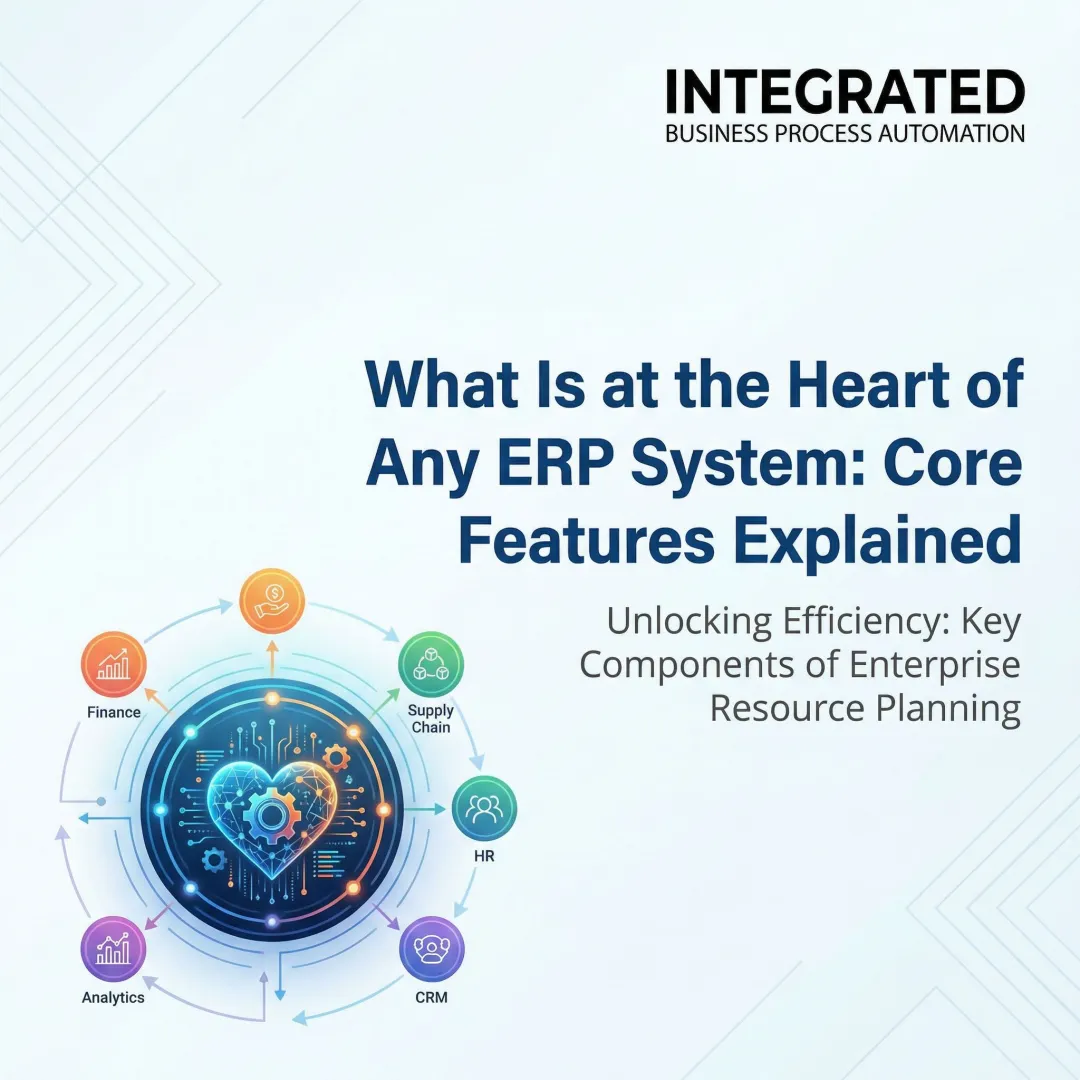
ERP modules solve this problem by unifying business functions (finance, procurement, inventory, sales, HR) into one integrated system where data flows automatically between departments. When a purchase order is raised, inventory updates instantly, finance entries are triggered automatically, and reports reflect real-time information with no manual re-entry or reconciliation delays.
This guide breaks down what ERP modules are, the core and extended types available, and how to choose the right combination for your business stage and industry.
TL;DR
- ERP modules are individual components managing specific business areas—finance, inventory, HR, sales—all sharing one common database
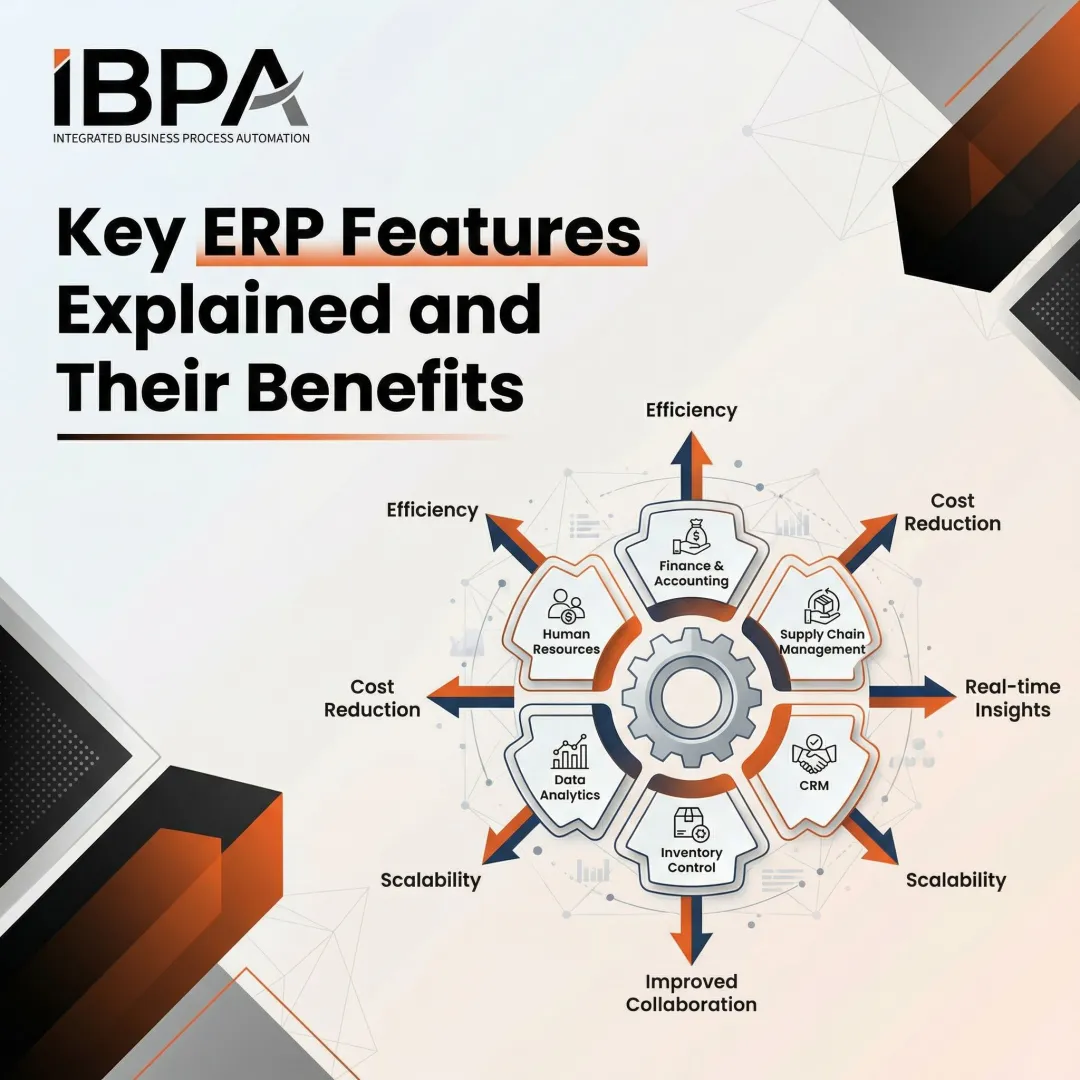
- Core modules—Finance & Accounting, Procurement, Inventory, CRM, and HR—form the operational backbone for virtually any business
- Extended modules like Manufacturing and Warehouse Management address specialized industry needs
- Choose modules based on your pain points, business model, and GST and compliance needs, not by chasing the longest feature list
- Start with 2-3 core modules and expand in phases—this approach consistently outperforms full-suite deployments
What Are ERP System Modules?
ERP modules are individual application components within an ERP system, each focused on a specific business function—finance, procurement, HR, inventory—that connect to a shared central database. This unified architecture ensures every department works from the same accurate, real-time data rather than maintaining separate systems that require manual synchronization.
Here's what that looks like in practice. When a purchase order is raised in the Procurement module, the system automatically:
- Updates inventory levels upon goods receipt
- Triggers payment entries in the Finance module
- Generates vendor performance reports in Analytics
- Reflects stock availability in the Sales module
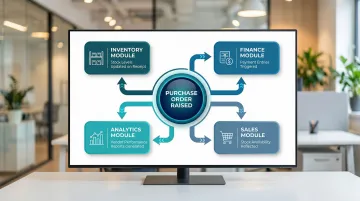
All of this happens without any manual data re-entry, eliminating the reconciliation errors and delays common with standalone software.
That connected workflow is only possible because of how ERP modules are architected — and the architecture itself offers a practical advantage for growing businesses.
You don't need to implement everything at once. Start with the modules addressing your biggest pain points today — typically Finance (including GST compliance) and Inventory for product businesses, or Finance and CRM for service companies — then add Manufacturing, Warehouse Management, or HR modules as operations grow. This phased approach reduces implementation risk and allows teams to adapt before adding more modules.
Core ERP Modules Every Business Should Know
While ERP systems can include dozens of modules, a specific set forms the operational backbone for virtually any business—whether product-based or service-based. These core modules handle the fundamental processes required to run daily operations.
Finance and Accounting Module
Finance is where every business decision ultimately lands. This module manages the general ledger, accounts payable and receivable, billing, tax compliance, and financial reporting—giving businesses a real-time picture of their financial health rather than waiting until month-end close.
India-specific compliance requirements:
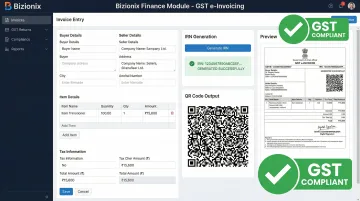
For Indian MSMEs, this module must handle GST-compliant invoicing, automated e-invoicing with IRN generation, and TDS/TCS management. With mandatory e-invoicing for businesses exceeding ₹5 crore in annual turnover and new 30-day reporting limits for those over ₹10 crore, a compliant ERP finance module isn't optional—it's operational infrastructure.
Bizionix's Finance module handles this through direct API integration with the GST e-Invoice system. When you create a sales invoice, the system validates data against GST requirements, generates the IRN and QR code via direct IRP connection, and produces government-compliant formats in seconds—no manual JSON uploads, no portal errors.
Procurement and Purchase Management Module
Procurement covers the end-to-end purchase process: raising purchase requisitions, collecting vendor quotes, issuing purchase orders, tracking deliveries, and maintaining a centralized approved-vendor list. Automated procurement reduces maverick spending, speeds vendor negotiations, and ensures materials arrive on time.
- Eliminates manual purchase order creation and approval chains
- Provides vendor performance analytics for better negotiation
- Reduces production delays caused by material shortages
- Prevents excess inventory from uncoordinated purchasing
Inventory Management Module
Inventory management tracks stock levels, item locations, and movement in real time—from goods receipt to dispatch—helping businesses avoid both stockouts and excess inventory.
Organizations using integrated warehouse management achieve 99.9% inventory accuracy compared to the 95-98% typical with manual systems.
Core functions include:
- Multi-location tracking across warehouses and branches
- Stock valuation methods (FIFO/LIFO/weighted average)
- Reorder alerts based on minimum stock levels
- Integration with purchase and sales modules for automatic updates
Customer Relationship Management (CRM) Module
CRM within ERP consolidates all customer and prospect data—contact history, purchase records, outstanding quotes, service tickets—into one place, making sales and support teams more informed and responsive.
Standalone CRM tools create blind spots. ERP-integrated CRM eliminates them.
Why integrated CRM is more powerful:
Unlike standalone CRM tools, ERP-integrated CRM connects directly to:
- Inventory (to confirm stock availability during sales calls)
- Finance (to check outstanding payments before processing new orders)
- Order Management (to provide real-time delivery updates)
A sales rep can close a deal, confirm stock, and flag an overdue payment—all without leaving a single screen.
HR and Payroll Module
HR and Payroll covers the full employee lifecycle: onboarding, attendance and leave tracking, payroll processing with statutory compliance (PF, ESI, TDS), performance records, and offboarding—all within the same system managing your business operations.
Why this matters for MSMEs:
Manual payroll in spreadsheets is error-prone and compliance-heavy. An integrated HR module eliminates duplicate data entry and processes salaries accurately and on time, every month. Finance and accounting employees save 14.5 hours per week when using integrated ERP systems compared to disconnected tools.
Extended ERP Modules for Specialized Business Needs
Core ERP modules handle the fundamentals, but manufacturers, warehouse operators, and data-driven teams often need more. Extended modules address the operational gaps that arise as Indian MSMEs scale — from managing production floors to tracking every SKU movement and generating reports without manual data pulls.
Manufacturing and Production Module
This module helps manufacturers plan production runs, manage bills of materials (BOMs), track work orders, monitor shop floor activity, and compare actual output against planned production. When managed manually, engineers lose an average of 159 hours per year to administrative BOM tasks alone — time that should go toward production, not paperwork.
Best suited for:
- Product manufacturers with multi-stage production processes
- Assembly operations coordinating raw materials, machinery, and labor
- Businesses where BOM accuracy directly impacts material costs and production timelines
Warehouse Management Module
Once goods are produced, they need to move accurately and fast. This module guides warehouse staff through receiving, putaway, picking, packing, and shipping — optimizing physical layout and movement to reduce handling time and errors. High-performing warehouses achieve 98.5–99.8% order picking accuracy, while poorly optimized operations fall below 98%, leading to costly fulfillment errors.
Measurable value:
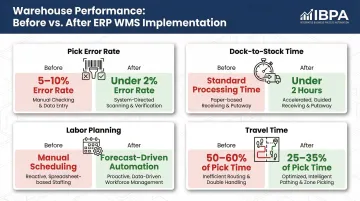
Businesses operating their own warehouses typically see fast ROI through:
- Reduced pick errors (from 5-10% down to under 2%)
- Faster dispatch (dock-to-stock under 2 hours)
- Better labor planning based on order volume forecasts
- Travel time reduction (from 50-60% down to 25-35% of total pick time)
Reporting and Business Intelligence Module
With production and warehouse data flowing into one system, the reporting module pulls it all together. It aggregates data from every ERP module into dashboards, custom reports, and trend analyses — giving leadership a clear, real-time picture of how the business is actually performing.
Practical outputs include:
- Profit and loss by department or product line
- Top-performing products and slow-moving inventory
- Overdue receivables by customer and aging analysis
- Cash flow forecasts based on expected receipts and payments
Organizations reduce the time required for reporting and analysis by 39% on average when using integrated ERP reporting versus manual consolidation from multiple systems.
Business Benefits of Implementing ERP Modules
Each ERP module individually improves a specific function, but the real value emerges when modules work together—data created in one module instantly informs decisions in another.
Single Source of Truth
When Finance, Inventory, Sales, and HR all draw from one database, there are no data discrepancies between departments, no reconciliation delays, and no decisions made on outdated information.
This directly eliminates a common MSME problem: the sales team quoting delivery dates based on stale inventory data, or finance chasing procurement for purchase details that were never logged.
Operational Efficiency Gains
ERP modules automate routine tasks—invoice generation, reorder alerts, payroll calculations, purchase order creation—freeing staff from manual follow-ups. Organizations report 106% ROI over three years with a 16-month payback period for midmarket ERP implementations, driven largely by time savings and error reduction.
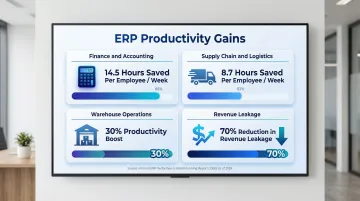
Specific productivity improvements:
- Finance and accounting: 14.5 hours saved per week per employee
- Supply chain and logistics: 8.7 hours saved per week per employee
- Warehouse operations: 30% productivity boost
- Revenue leakage: 70% reduction through improved financial integrity
Compliance and Audit Readiness
Integrated modules maintain complete audit trails of every transaction across departments (purchase approvals, stock movements, payment records), making regulatory compliance and internal audits significantly easier to manage.
For Indian businesses, this matters most around GST. 78% of medium enterprises face challenges complying with GST regulations, often fielding multiple notices from CGST, SGST, and IGST authorities. A unified ERP system reduces that exposure by keeping records accurate, timestamped, and ready for review.
How to Choose the Right ERP Modules for Your Business
The right module selection is driven by your business model, current bottlenecks, and growth stage—not by vendor defaults or industry trends. A trading company has different priorities than a manufacturer or service firm.
Practical decision framework:
Identify your top 3 operational pain points today — These point directly to which modules you need first. If cash flow visibility is unclear, start with Finance. If inventory errors cause delivery delays, prioritize Inventory Management.
Assess which processes are currently manual and error-prone — Manual payroll processing signals HR module need; spreadsheet-based inventory tracking indicates Inventory module priority.
Consider regulatory requirements specific to your industry and location — For Indian businesses exceeding ₹5 crore turnover, GST e-invoicing capability is non-negotiable, making Finance module selection critical.
Evaluate your team's capacity to adopt new systems — A phased rollout starting with 2-3 core modules is more successful than full implementation at once. Phased rollouts reduce downtime by up to 50% and achieve 85% user satisfaction compared to 60% for "big bang" approaches.
Common selection mistakes to avoid:
- Choosing modules based on feature richness rather than fit to your actual workflows
- Purchasing a full suite when only 4-5 modules are needed
- Ignoring whether the ERP is configurable to your existing processes
- Underestimating the importance of local compliance features
That last point matters most for Indian MSMEs. Compliance gaps—particularly around GST e-invoicing—can create penalties that outweigh any efficiency gains from the ERP itself. Bizionix addresses this directly: it's built for MSME-scale operations, includes automated IRN generation via direct GST API integration, and avoids the configuration overhead that makes enterprise platforms like SAP impractical for growing businesses.
Frequently Asked Questions
What are the five ERP modules?
While the number varies by vendor, the five most commonly referenced core ERP modules are Finance & Accounting, Procurement, Inventory Management, CRM, and HR/Payroll. These cover the fundamental operational needs of most businesses regardless of industry.
What are the core ERP modules?
Core ERP modules are those a business cannot operate without — typically Financial Management, Procurement, Inventory, CRM, and HR. What sets them apart from extended modules is that they handle foundational operations rather than specialized functions. Financial Management anchors the entire system, serving as the record of every transaction with financial impact.
Is sales and marketing part of ERP?
Sales management via the CRM module is widely included in ERP systems, while marketing automation is sometimes offered as an extended module or integrated third-party tool. The degree of inclusion varies by ERP vendor and business need.
Do I need to implement all ERP modules at once?
No. Most businesses start with Finance, Inventory, and one or two critical modules, then add more as operations grow. This phased approach reduces implementation risk and gives teams time to adapt before expanding scope.
How do ERP modules share data with each other?
All ERP modules connect to a central shared database, so data entered in one module (a purchase order in Procurement, for example) automatically updates related records in Finance and Inventory without manual re-entry. This unified architecture removes the need to reconcile data across departments.
Which ERP modules are most important for small businesses?
For most small and mid-sized businesses, Finance & Accounting, Inventory Management, and Procurement form the essential starting point. In India, GST compliance makes Finance & Accounting non-negotiable from day one. CRM and HR can follow as the business scales, while industry-specific modules like Manufacturing or Warehouse Management depend on the business model.