Introduction
Most growing businesses start with a basic accounting tool—a spreadsheet, standalone software, or a manual ledger. For a while, these systems work. But as operations expand across sales, inventory, payroll, and procurement, cracks appear. Data sits in silos. The sales team's numbers don't match finance's records. Inventory costs are reconciled manually at month-end. GST returns require hours of data extraction and validation.
That fragmentation carries real financial risk. Studies show 88% to 94% of business spreadsheets contain errors, and those mistakes have caused million-dollar revenue misstatements in documented cases.
For Indian MSMEs crossing the ₹5 crore turnover threshold, the pressure compounds: without integrated systems, e-invoicing mandates and GST compliance become manual, error-prone burdens.
This guide explains what an ERP system means in an accounting context, how it differs from standalone tools, what features matter most, and how to recognize when your business has outgrown basic accounting software.
TLDR
- ERP connects accounting with every business function through a unified database—eliminating manual entry and data silos
- Financial entries are generated automatically as business events occur, not entered afterward
- For Indian MSMEs, cloud ERP handles GST compliance, e-invoicing, and multi-entity management in one platform
- Top-performing SMBs close their books in 3.5 days vs. 5.4 days for laggards—a 35% faster close enabled by ERP integration
What Is an ERP System in Accounting?
Enterprise Resource Planning (ERP) is software that connects all departments—finance, sales, inventory, HR, operations—into one unified system with a shared, real-time database. In accounting specifically, this means financial entries are generated automatically as business events happen, rather than being entered manually afterward.
How ERP Flows Into Accounting
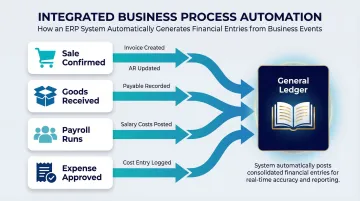
When a sale is confirmed, an invoice is created and accounts receivable updates instantly. When goods are received, a payable is recorded automatically. When payroll runs, salary costs hit the books without manual journal entries. This automatic flow—from operational activity to financial record—is what separates ERP accounting from traditional bookkeeping.
ERP vs. Standalone Accounting Software
ERP is not just accounting software with more features. The distinction is architectural. Accounting software manages financial transactions in isolation—you enter data manually, generate reports, and reconcile accounts. ERP connects financial data to the actual business activities generating it: a sale, a purchase order, a production run, a stock movement.
ERP Financials vs. the Broader ERP Suite
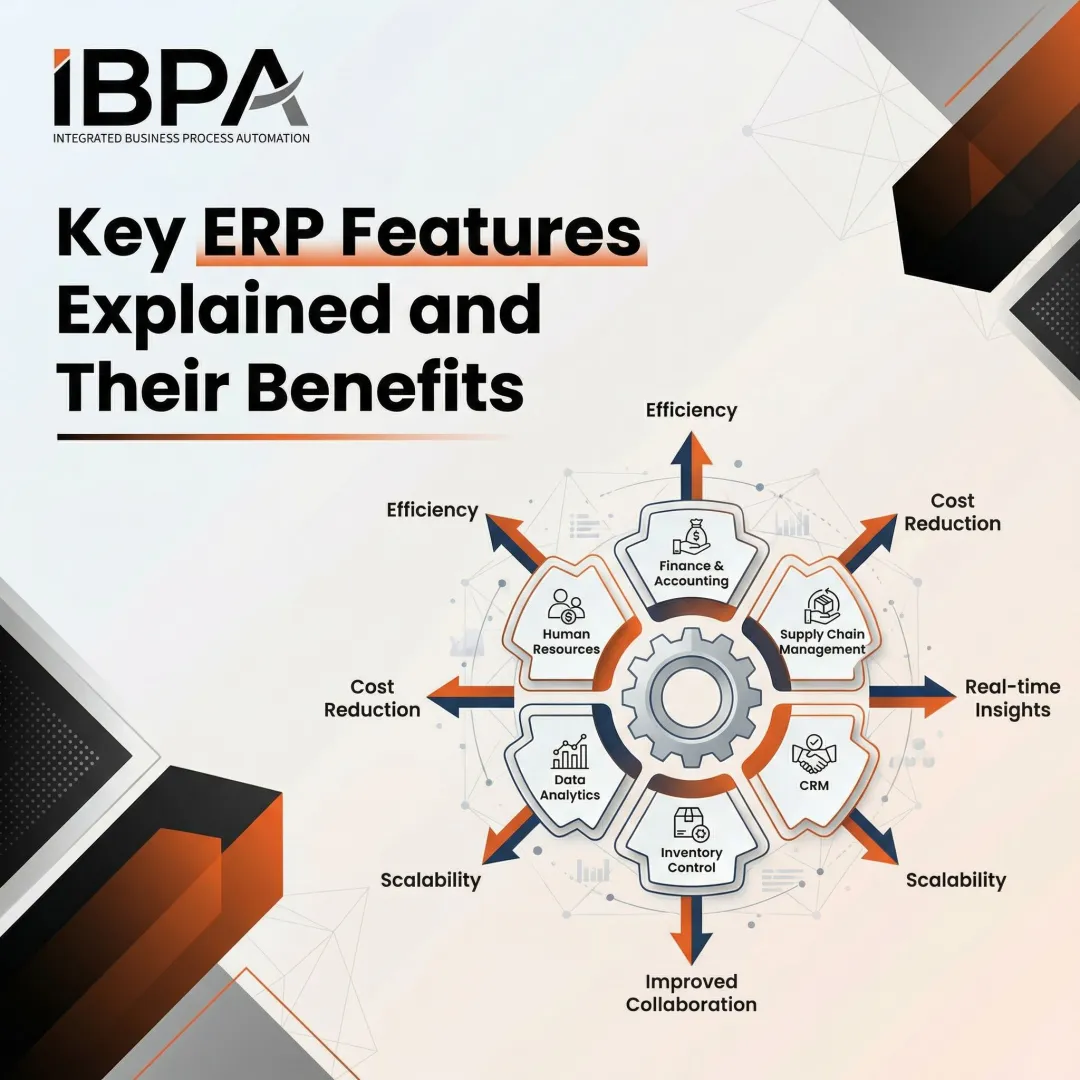
"Financials" in an ERP refers to accounting-specific modules: general ledger, accounts payable, accounts receivable, billing, payroll, and reporting. The broader ERP suite encompasses supply chain management, manufacturing, CRM, HR, and more. Accounting is the core of ERP—every operational activity ultimately flows into financial records—but it's not the whole system.
From Manufacturing Roots to Business Management Platform
ERP evolved from Material Requirements Planning (MRP) in the 1960s and Manufacturing Resource Planning (MRP II) in the 1980s. The term "Enterprise Resource Planning" was coined by Gartner in 1990. What separated true ERP from its predecessors was the presence of automatic interfaces between operations and accounting—an operational move automatically triggers a financial entry.
Today, cloud-based ERP has made this level of financial automation accessible to businesses well beyond large enterprises. Indian MSMEs can now run GST-compliant accounting, automated e-invoicing, and multi-company financials on a single platform—capabilities that previously required SAP-scale budgets and implementation teams.
Core Accounting Features of an ERP System
Integrated General Ledger and Automated Journal Entries
ERP automatically posts journal entries across the general ledger as transactions occur in other modules. When procurement approves a purchase order, the system triggers a payable in finance. When a sales invoice is generated, receivables update instantly. This eliminates double data entry and the reconciliation errors that come from maintaining separate systems.
The general ledger acts as a central repository, continuously receiving transactions from every business function to maintain real-time financial accuracy.
Accounts Payable and Receivable Automation
ERP tracks vendor invoices, payment schedules, and customer billing in one place:
- Payables: Bills approved in procurement flow directly to accounts payable with automatic matching against purchase orders and goods receipts
- Receivables: Payments received update customer accounts in real time, reducing manual follow-up and improving cash flow visibility
- Automated matching: The system reconciles invoices, payments, and outstanding balances automatically, cutting reconciliation time by up to 80%
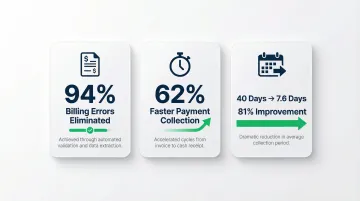
Modern invoicing automation within ERP can eliminate 94% of billing errors and cut payment collection time by 62%. In one documented case, AR automation slashed Days Sales Outstanding (DSO) from 40 days to 7.6 days—an 81% improvement.
Real-Time Financial Reporting and Dashboards
Because all departments feed into one database, finance teams can pull profit & loss statements, cash flow reports, and balance sheets at any moment, without waiting for month-end consolidation or chasing down data from different teams.
ERP dashboards provide live visibility into:
- Consolidated revenue across entities
- Outstanding receivables and payables
- Cash position and bank balances
- Expense tracking by department or project
- Real-time profitability analysis
Compliance and Tax Management
ERP systems can be configured with tax rules relevant to the business's jurisdiction. For Indian businesses, this includes:
- GST return preparation with automated data extraction
- E-invoicing with direct API integration to the GST Invoice Registration Portal (IRP)
- Instant IRN (Invoice Reference Number) and QR code generation
- Automated e-way bill creation for goods movement
- TDS calculations and reporting
- GSTR-2B matching to identify ITC mismatches early
Under current regulations, businesses with Annual Aggregate Turnover (AATO) of ₹5 crore and above must generate e-invoices with IRN and QR codes—and invoices without IRN are legally invalid, nullifying the buyer's Input Tax Credit eligibility. For businesses over ₹10 crore AATO, a strict 30-day IRP reporting window applies, making real-time ERP integration essential.
Multi-Entity and Multi-Location Management
Compliance gets more complex when a business operates across branches, subsidiaries, or multiple GST registrations. ERP handles this by allowing consolidated financial reporting while maintaining entity-level separation. Each location keeps its own books, GST compliance, and ledgers, while head office accesses group-level dashboards and consolidated analytics from a single login.
Bizionix supports this with instant switching between companies and full group visibility, all within one secure session.
ERP vs. Standalone Accounting Software: Key Differences
Scope of Data
Standalone accounting software only captures financial transactions entered manually. You create invoices, record expenses, and generate reports—but the system doesn't know what's happening in inventory, sales, or operations unless you tell it.
ERP pulls financial data automatically from across the business. Inventory movements, sales orders, procurement, HR activities—all feed into the financial ledger without manual intervention, creating a richer and more accurate financial picture.
Real-Time vs. Periodic Data
In standalone software, financial reports reflect what was manually entered—often with delays. You might be looking at last week's data or waiting for month-end entries to complete.
In ERP, every operational event immediately updates financial records. The finance team works with live data, not stale entries. This means your cash position, outstanding receivables, and profitability are visible in real time, without waiting on reconciliation.
Inventory and Operational Integration
Accounting software typically has limited or no inventory management. You might track inventory in spreadsheets and manually adjust COGS (Cost of Goods Sold) in your accounting system.
ERP links inventory levels, COGS, and warehouse movements directly to the financial ledger. When stock is consumed or sold, the financial impact is recorded automatically. This integration is especially critical for manufacturing and distribution businesses where inventory represents significant capital.
Scalability and Growing Complexity
Standalone accounting tools work well early on but create friction as businesses grow—more entities, more transactions, more compliance requirements. You end up maintaining multiple tools, exporting data for consolidation, and spending hours reconciling discrepancies.
ERP scales with the business. Cloud platforms like Bizionix are built specifically for Indian MSMEs that have outgrown basic accounting tools but don't need SAP-level complexity or cost.
Bizionix handles GST-ready accounting, automated e-invoicing, multi-company management, and real-time reporting in a single platform—without requiring a large IT team or months of implementation.
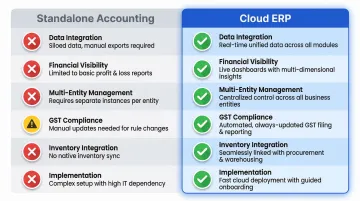
| Feature | Standalone Accounting | Cloud ERP |
|---|---|---|
| Data Integration | Manual entry from other systems | Automatic from all departments |
| Financial Visibility | Periodic (after data entry) | Real-time (as events occur) |
| Multi-Entity Management | Requires separate instances | Unified with consolidated reporting |
| GST Compliance | Manual or limited automation | Automated e-invoicing with API integration |
| Inventory Integration | None or basic | Full integration with COGS automation |
| Implementation | Quick but limited | Fast for cloud ERP, comprehensive features |
How ERP Accounting Transforms Business Operations
Eliminates Departmental Data Silos
When sales, inventory, and finance run on separate tools, data has to be reconciled manually and errors multiply. Sales reports one revenue figure, finance has another, and inventory shows stock levels that don't match purchase records.
ERP gives every department a single source of truth. The numbers the sales team sees match what finance is tracking. Inventory costs flow directly into financial reports without manual reentry. Everyone works from the same real-time data, eliminating the "which version is correct?" problem.
Accelerates Financial Close and Audit Readiness
Because every transaction is recorded automatically and linked to its source (a purchase order, a sales invoice, a payroll run), month-end closing becomes faster and audits are simpler.
Top-performing MSMEs close their books in 3.5 days compared to 5.4 days for slower-moving businesses, a 35% improvement linked directly to ERP adoption. In practice, businesses moving to automated financial close processes routinely drop closing times from 7–10 days to 2–3 days.
AI-driven automation within cloud ERPs can reduce month-end closing from an average of 8.7 days to 3.2 days, a 63% reduction that frees finance teams for higher-value work.
The audit trail is built in. Every entry shows who made it, when, and why. Financial data is audit-ready without scrambling to reconstruct transaction histories from multiple systems.
Enables Smarter Financial Decisions
With real-time dashboards and consolidated reporting, business owners and CFOs can spot cash flow issues, track outstanding receivables, and identify cost overruns early — before they become problems.
ERP turns raw transactional data into clear financial insight that teams can act on:
- Identify which products or customers are most profitable
- Track project costs against budgets in real time
- Monitor vendor payment terms and optimise cash flow
- Analyse expense patterns across departments or locations
- Forecast cash requirements based on current receivables and payables
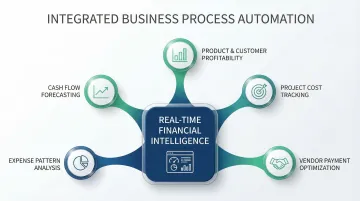
For growing MSMEs, this means finance stops being a month-end summary and becomes a tool for day-to-day decisions — from managing working capital to timing vendor payments.
Signs Your Business Needs an ERP for Accounting
Manual Reconciliation Consuming Finance Team Time
Your finance team spends hours reconciling data from different tools—sales data in one system, invoices in another, inventory in spreadsheets. Month-end becomes a multi-day exercise in hunting down discrepancies and verifying numbers across departments.
Managing Multiple GST Registrations or Entities Manually
You're managing multiple GST registrations, company entities, or branch locations, but generating consolidated financial reports requires manual data gathering, Excel consolidation, and hope that nothing was missed. Each entity maintains separate books, making group-level visibility difficult without significant manual effort.
Month-End Close Takes Too Long
Your month-end close takes more than a few days because data has to be collected, verified, and entered from multiple sources. You can't close the books until everyone submits their reports, and discrepancies require additional rounds of investigation.
Current Tools Can't Handle Growth
Your business is growing—adding products, locations, or headcount—and your current accounting tool is struggling to keep up with transaction volume or compliance requirements. Reports take longer to generate, errors are increasing, and the system feels like it's holding you back rather than enabling growth.
Billing Errors and Compliance Issues
You've experienced billing errors, missed payments, or compliance penalties because data isn't in sync across departments. Common triggers include:
- Sales creates an invoice that finance doesn't see until days later
- GST returns require manual data extraction and validation
- Missed deadlines from mismatched records across departments
These pain points are especially common among Indian MSMEs scaling from ₹5 crore to ₹50+ crore in revenue, where operational complexity outpaces the tools in use. Bizionix is built for this transition—covering accounting, inventory, payroll, and GST compliance in a single cloud platform designed for businesses at this stage of growth.
Frequently Asked Questions
How is ERP used in accounting?
ERP automates core accounting tasks—journal entries, invoicing, payables, receivables, and reporting—by connecting financial records directly to business operations. As events occur across departments (a sale, a purchase, a payroll run), financial entries are posted automatically to the general ledger in real time, eliminating manual data entry and reconciliation delays.
What are ERP accounting systems?
ERP accounting systems are integrated software platforms that include accounting as one of several interconnected modules. Unlike standalone accounting software, they connect financials with inventory, sales, procurement, HR, and other business functions through a shared database—so operational activities automatically generate corresponding financial entries.
What is the difference between ERP and accounting software?
Accounting software manages financial transactions in isolation, requiring manual data entry for each transaction. ERP is broader—it automatically generates accounting entries from operational events across the business, providing real-time financial visibility and connecting every activity's impact directly to the general ledger.
Can an ERP system help with GST compliance and e-invoicing?
Yes. Cloud ERP systems built for Indian businesses automate GST return preparation, generate GSTN-compliant e-invoices, and integrate directly with the GST e-Invoice system for instant IRN generation. Bizionix extends this further with real-time invoice validation, automatic QR code creation, and direct API connectivity with the Invoice Registration Portal.
What are the core accounting modules in an ERP system?
The primary accounting modules include general ledger, accounts payable, accounts receivable, payroll, billing, financial reporting, and tax management. More advanced platforms add fixed asset management, multi-currency support, TDS management, bank reconciliation, and audit trail tracking with role-based access controls.